Chatbots have evolved from simple website widgets into powerful conversion and support tools. But not all chatbots are created equal, and choosing the wrong type can lead to missed leads or a poor user experience. If you're using HubSpot or considering it, understanding your options is key.
There are four main types of chatbots: live chat, rule-based bots, hybrid bots, and AI-powered chatbots. The right choice depends on your team's availability, the complexity of your visitors' questions, and your conversion goals.
What Is a Chatbot (and Why Does It Matter for Your Website)?
A chatbot is a tool that enables visitors to interact with your website in real-time through a messaging interface. Depending on how it's built, it can answer questions, collect contact information, route people to the right resources, and even qualify leads before a salesperson ever gets involved.
In an inbound marketing strategy, chatbots fill a critical gap. Your website is live 24 hours a day, but your team isn't. A chatbot makes sure visitors get a response the moment they need one, instead of leaving your website because no one was around to help.
Chatbots can support:
- Lead generation by capturing contact info and qualifying prospects
- Customer support by answering common questions instantly
- Sales qualification by asking the right questions before routing to a rep
HubSpot handles all of this through its Conversations tool and Chatflows, which let you build and manage every type of chat experience from one central place.
The 4 Main Types of Chatbots in HubSpot
1. Live Chat
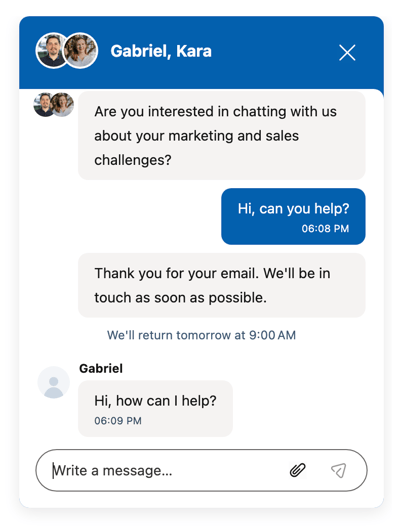
Live chat is exactly what it sounds like. A visitor types a question, and a real person on your team responds. There's no automation, no pre-built decision tree, just a direct line to a human being.
In HubSpot, live chat routes incoming conversations to your Conversations Inbox, where your team can respond in real time or follow up later if the message comes in after hours.
Best for:
- High-touch sales processes where relationships matter
- Complex or nuanced questions that don't fit neatly into a script
- Businesses with team members available during peak website traffic hours
Pros:
- Personalized experience that builds trust quickly
- Great for closing deals or handling sensitive conversations
- Flexible and adaptable to any conversation
Cons:
- Requires someone to be actively monitoring and available
- Doesn't scale well without the right staffing
When to use it: Use live chat when your team can actively manage conversations, and you want to deliver a high-touch, consultative experience.
2. Rule-Based Chatbots
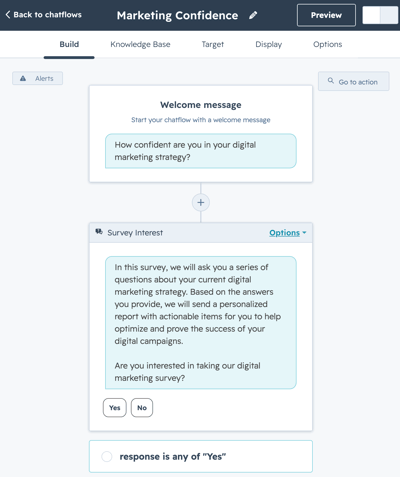
Rule-based chatbots use preset button menus and decision-tree logic to guide visitors through a conversation. Instead of typing freely, visitors select from options, and the bot responds with pre-written answers.
These are built directly inside HubSpot Chatflows and require zero ongoing involvement once they're set up.
Best for:
- Answering frequently asked questions
- Routing visitors to the right pages or resources
- Reducing repetitive inquiries that eat up team time
Pros:
- Available 24/7 without any staffing requirements
- Easy to control the messaging and keep it consistent
- Low maintenance once the initial flow is built
Cons:
- Limited flexibility if a visitor's question doesn't fit the options
- Can feel rigid or frustrating if the flow isn't designed thoughtfully
When to use it: Use rule-based bots when you need to answer common questions quickly and consistently, without pulling your team in.
3. Hybrid Chat
Hybrid chat combines the best of both worlds. It starts with automation to handle the initial interaction, then escalates to a live person when the conversation gets more complex or when a visitor specifically asks for help.
HubSpot makes this seamless. The bot collects information upfront, and when it's time to hand off, the conversation moves into the Conversations Inbox so a team member can pick up right where the bot left off.
Best for:
- Lead generation and qualification
- Businesses that want efficiency without sacrificing the personal touch
- Teams that aren't always available but still want to capture every opportunity
Pros:
- Flexible experience that adapts to what the visitor actually needs
- Captures leads and information even outside of business hours
- Reduces the workload on your team by handling the easy stuff first
Cons:
- Requires thoughtful setup to make the handoff feel natural
- Needs clear escalation paths so visitors don't get stuck
When to use it: Use hybrid chat when you want to automate the first interaction but still have a human available when it matters most.
4. AI-Powered Chatbots
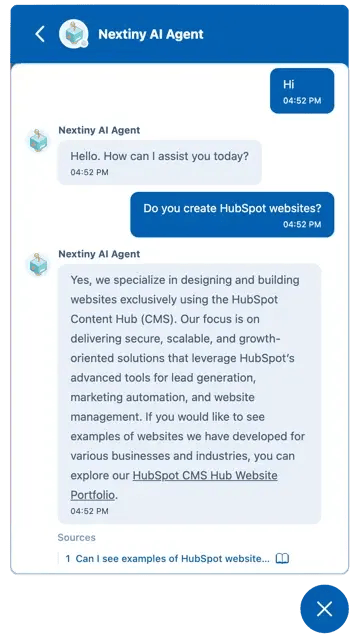 AI-powered chatbots are the newest category, and they represent a significant leap forward. Instead of button menus or rigid scripts, these bots understand natural language. Visitors type questions the way they'd actually ask them, and the bot responds dynamically based on what it's been trained on.
HubSpot now includes AI chatbot capabilities through its Customer Agent and AI Chat features. These bots can be trained on your website content, knowledge base, or internal documentation, so they give answers that are actually relevant to your business.
Best for:
- Scaling support without hiring additional staff
- Handling open-ended or unpredictable questions
- Improving response speed and availability across the board
Pros:
- Highly scalable and available around the clock
- More natural experience that feels less like talking to a robot
- Reduces reliance on rigid menus or pre-built flows
Cons:
- Performs only as well as the content it's trained on
- Needs monitoring and ongoing refinement to stay accurate
When to use it: Use AI chatbots when you want to scale conversations, handle open-ended questions, and give visitors instant answers without building out a manual flow for every scenario.
Where Should Your Chatbot Live on Your Website?
Not every page on your site needs a chatbot, and popping one up everywhere can actually hurt the experience. The better approach is to think about what a visitor is trying to do on a specific page, then match the chatbot to that intent.
Smart placements to consider:
- Pricing pages: Visitors here are often close to a decision. A chatbot that offers to answer questions or connect them with someone on your team can be the nudge that converts them.
- Service pages: Great for qualification. Ask visitors what they're looking for and route them to the right resource or person.
- Blog pages: Use chatbots here for engagement, offering relevant content, inviting visitors to subscribe, or answering questions that come up naturally while reading.
What to avoid:
- Triggering the chatbot too aggressively on pages where people are just browsing
- Using the same chatbot message across every page, regardless of context
- Launching a chatbot that isn't actually monitored or maintained
The best chatbot placement depends on the intent of the page and where the visitor is in their buyer's journey.
How HubSpot Manages Chat Conversations
One of the biggest advantages of using HubSpot for chat is that everything flows into one place. No matter which type of chatbot you use, all conversations route to the HubSpot Conversations Inbox.
From there, your team can:
- Respond in real time or follow up later
- Assign conversations to specific team members
- See the full history of every interaction
- Trigger automated workflows based on how a conversation goes
That last point is worth highlighting. Because HubSpot ties chat directly into its CRM and automation tools, a chatbot conversation can automatically enroll a contact in a nurture sequence, create a deal, assign a task to sales, or send a follow-up email. It's not just a communication tool; it's a piece of a larger system.
How to Choose the Right Chatbot for Your Business
Here's a simple framework to help you decide where to start:
If you want a high-touch, personal experience → Live Chat
If you want simple, consistent automation → Rule-Based Chatbot
If you want efficiency with a human fallback → Hybrid Chat
If you want scale and intelligent responses → AI-Powered Chatbot
And if you're not sure, run through these questions:
- Does your team have the availability to monitor live conversations?
- Are the questions your visitors ask predictable and repeatable?
- Do you want to qualify leads before they reach your team?
- Do you need support available outside of business hours?
Your answers will point you toward the right option, and in many cases, the answer is to start simple and evolve from there.
Common Chatbot Mistakes to Avoid
Even a well-chosen chatbot can underperform if it's not set up thoughtfully. Here are the mistakes we see most often:
Overcomplicated flows. If your rule-based or hybrid bot has too many branches and dead ends, visitors will bail before they get an answer. Simpler is almost always better.
No human fallback. Every chatbot experience should have a path that leads to a real person. If a visitor can't get what they need from the bot, make it easy for them to reach your team, because if not, that can lead to frustration.
Poorly written responses. The quality of your chatbot is directly tied to the quality of what you put into it. Generic, robotic responses won't build trust. Write your bot the same way you'd want your team to speak to a customer.
Not aligning with the buyer's journey. A visitor just discovering your brand needs a different experience than someone who's been to your pricing page three times. Make sure your chatbot reflects where someone is in the process.
Ignoring the data. HubSpot gives you visibility into how your chatbot is performing. Review it regularly and make adjustments based on where visitors are dropping off or getting stuck.
Final Thoughts: Start Simple, Then Scale
Most businesses don't need to launch with an AI-powered chatbot on day one. The most successful chatbot strategies start with a clear goal, a simple setup, and a commitment to improving over time.
If you're just getting started, a rule-based or hybrid chatbot is usually the right move. It's fast to build, easy to maintain, and gives you real data to work with. Once you have a sense of what your visitors are actually asking and where they're getting stuck, you can layer in AI capabilities to handle the volume and complexity that grows with your business.
The goal isn't to have the most sophisticated chatbot. The goal is to have a chatbot that actually works for your visitors and your team.
FAQs
What is the best type of chatbot for lead generation? Hybrid and AI chatbots tend to perform best for lead generation because they can ask qualifying questions, capture contact information, and hand off to a human when the conversation heats up, all without requiring your team to be available 24/7.
Are AI chatbots better than rule-based chatbots? It depends on your goals. AI chatbots are more flexible and can handle open-ended questions, but rule-based bots are more controlled and predictable. For businesses that need consistency and have well-defined FAQs, rule-based bots are often the better starting point.
Can HubSpot chatbots work without a live agent? Yes. Both rule-based and AI chatbots can run fully automated without any human involvement. The bot handles the conversation, collects the information, and routes it appropriately, all on its own.
Where do HubSpot chat conversations go? All conversations, regardless of chatbot type, are routed to the HubSpot Conversations Inbox, where your team can view history, respond, assign, and take follow-up actions.
Not Sure Which Chatbot Is Right for You?
Choosing the right chatbot setup isn't just a technical decision; it's a strategic one. At Nextiny, we help businesses build smart, connected HubSpot systems that actually work. Whether you're starting from scratch or looking to improve what you already have, we'd love to talk through your options. Schedule a strategy call today to get started.