At Nextiny, we spend a lot of time helping companies improve the systems behind their marketing, sales, and Revenue Operations.
Duplicate data is one of the most common problems we encounter.
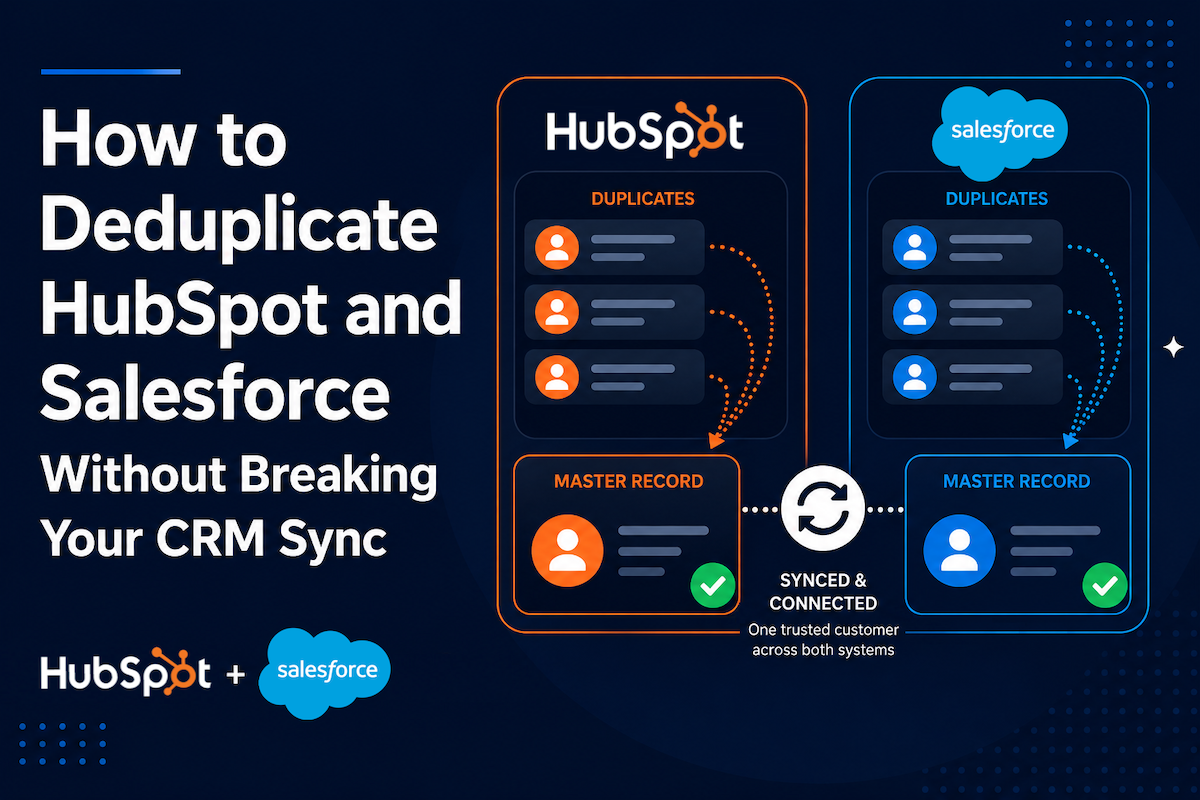
But there's an important difference between cleaning duplicate records inside HubSpot and cleaning duplicates when HubSpot and Salesforce are actively working together.
When one CRM is involved, you're deciding which record should survive and what information it should retain.
When two CRMs are syncing, there's another question:
Will both systems still agree about which record represents the customer after the merge?
That's where duplicate management becomes an integration problem, not just a data cleanup problem.
As a HubSpot Solutions Partner and Insycle implementation partner, Nextiny helps companies build CRM data management processes that protect reporting, automation, attribution, and the connections between systems.
This article is based on an Insycle webinar where Gary Catterill walked through this exact HubSpot + Salesforce challenge and demonstrated a workflow for solving it.
Already dealing with duplicates inside HubSpot?
Start with our guide, How to Merge HubSpot CRM Duplicates Without Breaking Reporting, Workflows, or Your Pipeline. That article covers duplicate matching, master record selection, field retention, reporting, and large-scale HubSpot cleanup in detail.
This guide focuses specifically on what changes when Salesforce is part of the equation.
This webinar was originally produced by Insycle and demonstrates the cross-platform deduplication workflow discussed in this article. Since the webinar was recorded, HubSpot has introduced an updated version of its Salesforce company sync with improved company merge capabilities. Some integration behavior discussed in the recording may therefore differ depending on which version of the HubSpot-Salesforce integration your organization uses. We've noted those differences throughout this article.
TL;DR: HubSpot + Salesforce Deduplication Is a Cross-System Problem
If HubSpot and Salesforce are integrated, duplicate management isn't simply about finding two records that represent the same company and clicking "merge."
You need to make sure both CRMs continue pointing to the correct surviving record.
A safe cross-platform strategy should:
- Identify corresponding duplicates in Salesforce and HubSpot
- Establish which record should survive
- Preserve the Salesforce-to-HubSpot relationship
- Make the surviving-record decision available to both systems
- Retain important field values and associations
- Validate the outcome before making bulk changes
- Account for the version and configuration of your HubSpot-Salesforce integration
- Automate ongoing deduplication once the process has been tested
HubSpot's newer Salesforce company sync has improved native company deduplication and merge capabilities. But merging HubSpot companies still doesn't automatically merge the corresponding Salesforce records.
That's why companies operating both CRMs need to think beyond a HubSpot merge.
The goal is not simply to remove duplicate records. It's to maintain one trustworthy customer identity across both systems.
Related Insycle Article: How to Merge Duplicates in HubSpot and Salesforce and Keep them Syncing
Why HubSpot + Salesforce Duplicates Are Different
HubSpot and Salesforce can sync customer information so marketing and sales teams aren't working from completely separate databases.
That's incredibly valuable.
It also means your records have relationships that need to be protected.
During Insycle's HubSpot + Salesforce webinar, attendees were asked about their biggest integration challenges.
Duplicate management came out on top.
Participants described problems including:
- Difficulty building accurate distribution lists
- Trouble re-engaging contacts
- Unreliable data for internal workflows
- Too many unnecessary records and automations
- Poor overall data quality
- Multiple sales reps contacting the same person
Those aren't simply database-administration problems.
They're business problems created by fragmented customer data.
And once two CRMs are involved, fixing those problems requires thinking about both sides of the integration.
The HubSpot-Salesforce Integration Has Evolved
There's an important distinction to make before changing anything in your CRM.
HubSpot has introduced an updated Salesforce company sync with additional capabilities for company matching, deduplication, associations, selective sync, and company merges.
With the newer integration, HubSpot companies can be merged while continuing to sync with their associated Salesforce records.
That's a major improvement over older versions of the integration.
But there's an important limitation:
Merging companies in HubSpot does not automatically merge the corresponding Salesforce records.
In other words, native functionality has improved, but a HubSpot merge and a Salesforce merge are still not the same operation.
Organizations using an older version of the Salesforce integration may also encounter different company-merging behavior.
Insycle Supports Both Versions of the HubSpot-Salesforce Integration:
One advantage of using Insycle is that you can merge HubSpot companies regardless of which version of the HubSpot-Salesforce integration you're using.
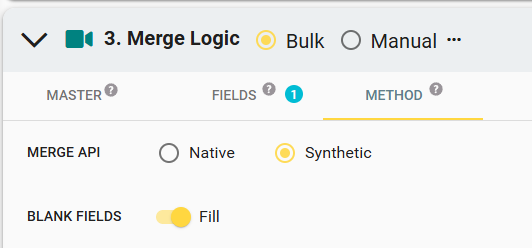
In Insycle > Merge Logic > Method, you can select the merge method that matches your integration:
-
Synthetic — Choose this method if you're using the previous version of the HubSpot-Salesforce integration.
-
Native — Choose this method if you're using the latest version of the HubSpot-Salesforce integration.
This gives teams flexibility to build a deduplication process around their current integration configuration rather than requiring an integration upgrade before beginning cleanup.
So before launching any large-scale deduplication project, determine:
- Which version of the HubSpot-Salesforce integration you're using
- Which objects are syncing
- How those records are currently matched
- Which system should control particular fields
- How a merge in one CRM will affect the corresponding record in the other
This is why we treat HubSpot + Salesforce deduplication as an integration architecture decision, not just a database cleanup exercise.
Related Insycle Article: Taming the Two-Way Sync: Preventing Duplicates in HubSpot Before They Sync Into Salesforce
The Real Question: Which Record Should Both CRMs Trust?
Suppose Salesforce contains two accounts representing the same company. HubSpot also contains duplicate company records. You can determine that they're duplicates. You can even decide which record has better data.
But that doesn't fully solve the problem.
You also need HubSpot and Salesforce to agree about the surviving record.
During the webinar, Garry demonstrated a clever way of accomplishing this with a shared Deduplication Master Record designation.
The basic idea is simple: Make the decision in one system, communicate that decision to the other system, and use the same master when performing the corresponding merge.
That creates a shared reference point between the two CRMs.
A Cross-Platform Workflow for HubSpot + Salesforce Deduplication
The workflow demonstrated by Insycle starts in Salesforce and then carries the master-record decision into HubSpot.
Before You Start: Protect HubSpot Records From Salesforce Deletions
Before merging duplicate records in Salesforce, review your HubSpot-Salesforce integration's deletion settings.
To ensure that corresponding HubSpot records are not automatically deleted when records are merged in Salesforce, go to the HubSpot-Salesforce integration settings under:
Sync rules > Deleting [Objects]
Configure the relevant deletion rules to Do nothing:
- When a Salesforce company is deleted → Do nothing in HubSpot
- When a Salesforce contact is deleted → Do nothing in HubSpot
- When a Salesforce lead is deleted → Do nothing in HubSpot
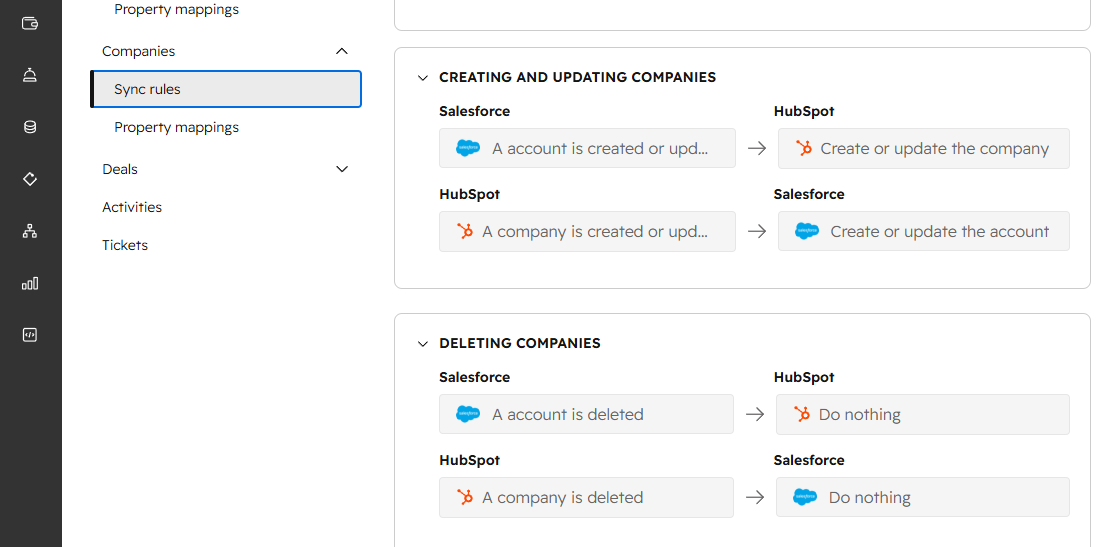
This safety step is important because the workflow intentionally processes the Salesforce duplicates first and then carries the surviving-record decision into HubSpot. You want the HubSpot duplicates to remain available so they can be processed using the corresponding master-record logic.
Step 1: Find the Salesforce Duplicates
First, identify duplicate Salesforce records.
In the webinar demonstration, Gary used Salesforce accounts and started with account name. In a real database, however, duplicate detection may require multiple criteria, such as:
- Account or company name
- Website domain
- Phone number
- Country or region
- Additional domains
- Related fields
You may also need matching rules that account for variations such as "Inc.," "Incorporated," "Ltd.," punctuation, abbreviations, or other differences that don't necessarily mean two records represent different businesses.
The exact matching strategy depends on your data.
But this is where our existing HubSpot deduplication guide goes much deeper. For this cross-platform process, the more important issue comes next.
Step 2: Decide Which Salesforce Record Should Survive
Once you've identified a legitimate duplicate group, determine the Salesforce master. That decision shouldn't necessarily be based on which record was created first.
Depending on your business, the correct master might be the record with:
- The correct or active owner
- The most complete information
- The most recent activity
- The strongest engagement history
- The correct account relationships
- The most important associated business data
You should also establish field-retention rules so useful information from secondary records isn't unnecessarily discarded.
But remember: selecting the Salesforce master is only half the job.
HubSpot needs to know about that decision too.
Step 3: Tag the Salesforce Master Record
This was one of the most important parts of the Insycle demonstration.
Instead of asking HubSpot to independently decide which record should survive, the workflow creates a custom field identifying the record selected as the master.
In the webinar, that field was: Deduplication Master Record = Yes
When the Salesforce merge is completed, the surviving account is tagged as the master. Now you have something that can be communicated across the integration.
Step 4: Sync the Master Designation Into HubSpot
Next, map the custom master-record field between Salesforce and HubSpot. In the workflow demonstrated during the webinar, the Salesforce custom field is mapped to a corresponding HubSpot property.
Once that value syncs, the matching HubSpot company now contains the same designation:
Deduplication Master Record = Yes
This is the key.
HubSpot no longer needs to independently determine which company should win. Salesforce has already made that decision. The integration communicates it to HubSpot.
Step 5: Merge the HubSpot Duplicates Using the Same Master
Now the corresponding duplicate group can be processed in HubSpot.
Instead of using a completely separate set of rules to select the HubSpot master, the process looks for the company tagged:
Deduplication Master Record = Yes
That record becomes the HubSpot master.
The result is a coordinated sequence:
Salesforce duplicates → Salesforce master → Master tagged → Tag syncs to HubSpot → HubSpot uses the same master → Cross-system relationship is preserved
This is the part that makes the workflow fundamentally different from ordinary HubSpot deduplication. You're not running two unrelated cleanup projects.
You're orchestrating one cleanup process across two connected systems.
Related Article: How to Merge HubSpot CRM Duplicates Without Breaking Reporting, Workflows, or Your Pipeline
Why the Salesforce Account ID Matters
One of the things Gary demonstrated during the webinar was verifying the Salesforce Account ID after the HubSpot merge. That validation is important because the Salesforce relationship isn't an abstract concept. HubSpot needs to remain connected to the correct Salesforce record.
After the corresponding records were processed, the surviving HubSpot company still referenced the Salesforce Account ID associated with the Salesforce master.
That's the outcome you're trying to protect.
A database that looks cleaner but contains broken cross-system relationships isn't actually cleaner. It's just broken in a different way.
Your Matching Logic Should Be Consistent Across Both CRMs
Another easy mistake is creating one definition of a duplicate in Salesforce and another in HubSpot. If you're matching Salesforce accounts using account name and website, for example, the corresponding HubSpot process should use equivalent company fields whenever possible.
That doesn't mean the two databases will always be identical. They won't. But your logic should be intentionally aligned.
The webinar demonstrated ways to account for:
- Company name variations
- Domains and additional domains
- Symbols
- Common business suffixes
- Phone-number variations
- Geographic differences
- Related fields
This becomes particularly important for organizations with international subsidiaries or multiple business units.
"Acme US" and "Acme UK" may share similar names without actually being records you want to merge.
Cross-platform matching should reflect how your business defines a customer, not simply which strings happen to look alike.
Don't Forget Field Retention
Choosing the correct master doesn't mean every value on the other record should disappear.
Imagine the Salesforce master has the correct account owner, while a duplicate contains a phone number that doesn't exist on the master. Or perhaps one HubSpot company contains an additional domain or other useful information.
A well-designed merge strategy determines both:
Which record survives? and Which data survives?
Insycle's webinar demonstrated retention rules for information such as company owners, phone numbers, domains, email addresses, multi-select properties, and custom property values. Associated contacts, deals, and activities also need to be considered as part of the overall migration of customer context.
The objective is a more complete master record, not simply fewer records.
Preview the Cross-System Outcome Before You Merge
This is one place where our advice for HubSpot-only cleanup and HubSpot + Salesforce cleanup is exactly the same:
Don't make large-scale CRM changes without testing them first.
Insycle's Preview Mode allows teams to review the proposed merge before updating production records.
For a cross-platform project, we'd pay particular attention to:
- Which duplicate groups were identified
- Which Salesforce record was selected as master
- Whether the master designation synced correctly
- Which HubSpot record will survive
- Which field values will be retained
- Whether Salesforce IDs and associations remain correct
- Any groups where the system couldn't confidently select a master
Use a small representative sample first. Validate it. Then scale.
When thousands, or hundreds of thousands, of customer records are involved, a preview isn't an optional convenience. It's part of responsible CRM governance.
From CRM Cleanup to Automated Data Governance
The best deduplication project is one you don't have to repeat every six months.
Once the matching rules, master-selection logic, property mappings, and merge process have been tested, you can begin moving from cleanup to prevention. This was another important part of Insycle's webinar.
The demonstrated architecture combined:
Salesforce Flow + Insycle + HubSpot Workflows
For example:
- A Salesforce account is created or updated.
- Salesforce Flow triggers the deduplication process.
- The Salesforce duplicates are evaluated and processed.
- The surviving record receives the master designation.
- That property syncs to HubSpot.
- The HubSpot property update triggers a workflow.
- The corresponding HubSpot duplicate process runs using the designated master.
Now duplicate management isn't something an administrator has to remember to do every Friday afternoon. It becomes part of the system. That's an important transition.
CRM cleanup fixes your existing database. CRM governance changes what happens to your database tomorrow.
Two CRMs Shouldn't Mean Two Sources of Truth
This is ultimately the bigger RevOps lesson. Companies often connect HubSpot and Salesforce because they want marketing and sales to share information. But connecting two systems doesn't automatically create one source of truth.
You can still end up with:
- Different versions of the same account
- Conflicting property values
- Different ownership
- Fragmented activity histories
- Duplicate sales activity
- Confusing reporting
- Automations operating on different customer records
The technical integration may be working exactly as designed while the underlying data is still unreliable.
That's why data governance has to exist across the integration, not independently inside each platform.
Looking Ahead: AI Agents Need the Same Customer Across Both Systems
There's another reason this matters more now than it did a few years ago.
AI agents are increasingly being asked to use CRM data to research accounts, prepare sales reps for meetings, summarize customer history, identify opportunities, recommend next steps, and automate work.
- In a HubSpot-only environment, duplicate records can fragment that context.
- In a HubSpot + Salesforce environment, the problem can become even more complicated.
- Imagine an AI agent preparing a salesperson for a customer meeting.
- Salesforce contains the active opportunity and sales activity.
- HubSpot contains marketing engagement and website behavior.
- But duplicate records mean those activities aren't consistently associated with the same version of the customer.
- The agent doesn't magically know which record your organization considers authoritative.
- It can only reason over the context your systems make available.
That means CRM integration quality is becoming part of AI readiness.
The organizations that will get the most value from AI won't necessarily be the ones with the most customer data.
They'll be the organizations that can give AI accurate, unified, trustworthy customer context across their systems.
Deduplicating HubSpot and Salesforce isn't only about cleaner reporting today.
It's about creating a customer data foundation that both your people and your AI systems can trust tomorrow.
Frequently Asked Questions
Can You Merge HubSpot Companies While Salesforce Sync Is Active?
It depends on which version of the HubSpot-Salesforce integration you're using.
HubSpot's newer company sync supports HubSpot company merges while maintaining the relationship with the associated Salesforce record. Older versions of the integration have different limitations.
Before merging, verify your integration version and current sync configuration.
Does Merging Companies in HubSpot Also Merge the Salesforce Accounts?
No.
A HubSpot company merge does not automatically merge the corresponding Salesforce records.
That's one of the reasons cross-platform deduplication requires a coordinated strategy rather than treating each CRM independently.
Which CRM Should You Deduplicate First?
In the workflow demonstrated by Insycle, Salesforce is processed first.
The surviving Salesforce record is identified and tagged as the deduplication master. That designation then syncs into HubSpot so the corresponding HubSpot process can select the same surviving record.
Your specific architecture may require a different approach, so the workflow should always be validated against your integration configuration before making production changes.
How Do HubSpot and Salesforce Know Which Record Should Survive?
One approach is to create and map a custom property that identifies the master record.
In Insycle's demonstration, the Salesforce master receives a Deduplication Master Record designation. That value syncs to a corresponding HubSpot property, allowing the HubSpot merge process to identify the record connected to the Salesforce master.
Can HubSpot and Salesforce Deduplication Be Automated?
Yes.
The webinar demonstrated a process combining Insycle with Salesforce Flow and HubSpot Workflows so deduplication could be triggered as records were created or updated.
We recommend thoroughly testing matching, retention, and master-selection logic before moving a process like this into full automation.
Do HubSpot and Salesforce Natively Deduplicate Records Across Both CRMs?
HubSpot's newer Salesforce company sync includes improved company matching and deduplication capabilities based on mapped fields.
However, HubSpot and Salesforce remain separate CRMs, and merging HubSpot companies does not automatically merge Salesforce accounts.
Organizations with more complex duplicate-management requirements may therefore need additional processes or tools to coordinate cleanup across both systems.
How Do I Know If Our HubSpot + Salesforce Database Is Safe to Deduplicate?
Before merging at scale, audit:
- Your Salesforce integration version
- Current field mappings
- Record matching rules
- Salesforce IDs stored in HubSpot
- Master-record selection criteria
- Field retention rules
- Associations and ownership
- Automation dependencies
- Reporting dependencies
- Sync direction and conflict rules
Then test the proposed process on a controlled sample and validate the results in both systems before scaling.
Final Thoughts: Don't Treat This as Two Cleanup Projects
When HubSpot and Salesforce are connected, deduplication shouldn't be approached as:
Clean Salesforce. Then clean HubSpot.
The two systems are related. Your data management strategy should be too.
The real objective is to make sure the company your salesperson sees in Salesforce, the company your marketer sees in HubSpot, the customer your reports measure, and the account your AI agents analyze all represent the same customer reality.
That requires more than removing duplicate records.
It requires intentional matching rules, a shared master-record strategy, careful data retention, validation, and ongoing governance across the integration.
At Nextiny, we help companies evaluate CRM data quality, improve HubSpot and Salesforce processes, and implement tools like Insycle to build scalable data-management systems.
If duplicate data is creating problems across your HubSpot + Salesforce integration—or your team is avoiding cleanup because you're worried about breaking the sync, we can help you map the architecture before you start merging records.
About Nextiny
Nextiny is a HubSpot Solutions Partner and Insycle implementation partner helping organizations improve CRM data quality, Revenue Operations, automation, AI readiness, and the systems that connect marketing and sales.
Our goal isn't simply to clean your database. It's to help you build a CRM ecosystem your team can trust.